OpenAI made all three GPT-5.6 tiers (Sol / Terra / Luna) generally available on July 9; QCode offers Sol and Terra, and gpt-5.6-luna is not currently supported (removed from /models). This page is kept for historical reference. See the latest on GPT-5.6 →
Use GPT-5.5 in Codex CLI 0.124.0
As of 2026-10-07, OpenAI states that GPT-5.5 retires from ChatGPT, ChatGPT Work and Codex on all plans on 2026-10-14, and the OpenAI API isn't affected. Codex has supported GPT-5.5 officially since 2026-04-23; the 4-step model-catalog.json method below was written for Codex CLI 0.124.0 and is kept for reference.
Why this guide exists
This is how Codex CLI 0.124.0 behaved at the time: its default model table only had GPT-5 / GPT-5-Codex, /model did not show gpt-5.5, and putting model = "gpt-5.5" directly in config.toml errored out; the official way to extend the registry was model-catalog.json. Since 2026-04-23 Codex supports GPT-5.5 officially (codex --model gpt-5.5). From 2026-10-14 GPT-5.5 retires from Codex with ChatGPT sign-in; OpenAI points Plus, Pro, Business, Enterprise and Edu to GPT-6 Sol (gpt-6-sol), and Free and Go to GPT-6 Luna (gpt-6-luna) in the desktop app.
Prerequisites
- A QCode account (required to download the config file)
- Codex CLI 0.124.0 or later installed
- QCode already wired into ~/.codex/config.toml: Codex uses the Responses endpoint, with the Base URL https://api.qcode.cc/openai as given in the QCode docs (current Codex releases don't support a Chat Completions-only endpoint)
1. Download model-catalog.json
The model registration file for GPT-5.5 is packaged as a zip (~37 KB, ~231 KB after extracting). Click the button below, sign in to QCode, and download it locally.
Sign in to downloadThe file is only exposed to authenticated QCode users to prevent third-party hotlinking. Any QCode account (free or paid) can download it.
2. Place it in ~/.codex/
Extract the zip to get model-catalog.gpt-5.5.json, then drop it into Codex CLI's config root — the same folder as config.toml and auth.json.
# unzip and move
unzip model-catalog-gpt-5-5.zip
mv model-catalog.gpt-5.5.json ~/.codex/

# resulting layout:
#   ~/.codex/
#   ├── auth.json
#   ├── config.toml
#   └── model-catalog.gpt-5.5.json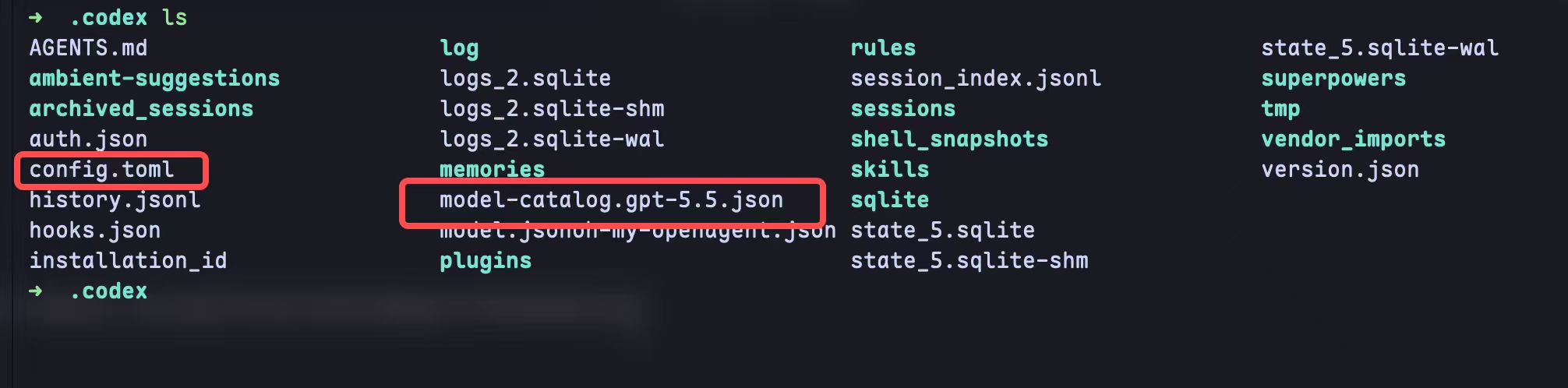
3. Edit ~/.codex/config.toml
Add one line, model_catalog_json, at the top of config.toml pointing at the file you just placed. Windows users: use double backslashes in the path.
# ~/.codex/config.toml
model_catalog_json = "./model-catalog.gpt-5.5.json"

# Windows:
# model_catalog_json = '.\\model-catalog.gpt-5.5.json'

model = "gpt-5.5"
# ... keep the rest of your provider / auth config unchanged
4. Restart Codex CLI and verify
Quit the current session and relaunch codex. Run /model inside — gpt-5.5 should now appear in the list and be the selected model.
$ codex
> /model
  ● gpt-5.5          ← enabled
    gpt-5-codex
    gpt-5
FAQ
When does GPT-5.5 retire from Codex?
On 2026-10-14. OpenAI states that GPT-5.5 retires from ChatGPT, ChatGPT Work and Codex on all plans that day, the OpenAI API isn't affected, and the model description says it remains available on the OpenAI API. If you sign in to Codex with ChatGPT, replace gpt-5.5 before then in workspace defaults, saved model settings, managed configurations, custom agents, scheduled tasks and scripts; with an API key, Codex model availability follows the API models available to your key. As of 2026-10-07, gpt-5.5 is callable on QCode.
Is GPT-5.5 priced differently from GPT-5.4?
Yes. OpenAI's API list prices per 1M tokens: GPT-5.5 is $5 input, $0.5 cached input and $30 output; GPT-5.4 is $2.5 input, $0.25 cached input and $15 output (OpenAI model page, checked 2026-10-07). On QCode usage is billed per token; per-model rates are on /models.
Why does the download require sign-in?
The config file is restricted to authenticated QCode users so it won't get indexed or hotlinked. Free accounts can download it too, and it doesn't consume quota.
gpt-5.5 still not showing up in /model?
First check codex --version is >= 0.124.0, then verify the model_catalog_json path in config.toml and that the JSON file is fully extracted (partial unzip is the most common cause).
Try GPT-5.5 and Claude Fable 5 today
QCode gives you both OpenAI and Anthropic flagship models through a single API key.
Create a QCode account
One key across Claude, GPT and Chinese models, billed per token — live rates on /models.